Ultrasonic Sensor + OLED Parking Sensor
Parking Sensor
##
Overview
- Build a parking sensor display using the ultrasonic sensor and OLED
- The sensor distance controls what is drawn on screen in real time
- Features
- Signal smoothing: average the last several readings to reduce noise
- Zone bitmaps: display a different graphic depending on how close the object is
- Continuous mapping: a sensor value drives a bar graphic directly
What We’re Building
- The OLED shows three things at once
- A bitmap that changes based on zone (FAR / NEAR / STOP!)
- The distance in inches
- A bar graph that fills as your hand gets closer
- Three zones based on distance
- FAR: more than 24 inches — green check graphic
- NEAR: between 4 and 24 inches — warning graphic
- STOP!: closer than 4 inches — red X graphic
OLED Layout
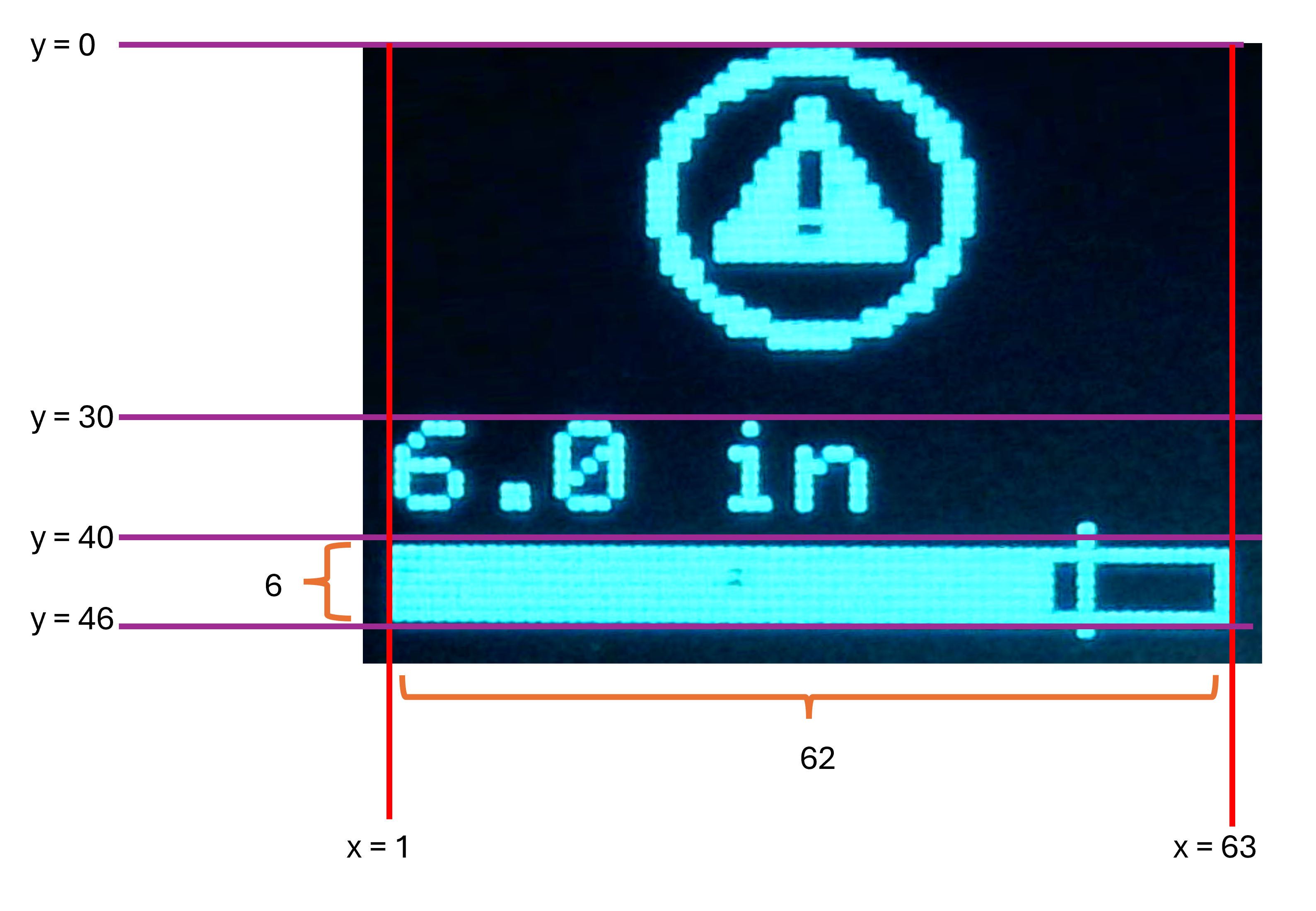
Sensor Noise
- Ultrasonic sensors occasionally return bad readings
- The pulse can reflect off a wall or surface behind your hand and come back late
-
Example: hand is 10 inches away, but sensor reads 145 inches
- Two kinds of bad readings
sensorTime == 0— no echo came back at all- Distance is unreasonably large — a ghost echo from somewhere else
Rolling Average
-
Instead of using a single reading each loop, we store the last 5 readings in an array and average them
-
If one reading is bad, it only has 1/5 the effect on the displayed value
-
We call this a rolling average (or sliding window average)
- The window “slides” forward with each new reading
- Old readings fall off the back; new readings come in the front
How the Array Works
- Store readings in a fixed-size array; track where the next one goes with
readIndex
readings[readIndex] = distanceIn;
readIndex = readIndex + 1;
if (readIndex >= NUM_READINGS) {
    readIndex = 0;              // wrap back to the start
}
- After storing the new reading, compute the average
float total = 0;
for (int i = 0; i < NUM_READINGS; i++) {
    total = total + readings[i];
}
return total / NUM_READINGS;
Handling Bad Readings
- If
distanceIn == 0, skip the array update entirely — keep the last good readings - If
distanceIn > MAX_RANGE_IN, storeMAX_RANGE_IN— treats “nothing nearby” as far away
if (distanceIn != 0 && distanceIn > MAX_RANGE_IN) {
    readings[readIndex] = distanceIn;

    readIndex = readIndex + 1;
    if (readIndex >= NUM_READINGS) {
        readIndex = 0;
    }
}
Bitmaps
drawBitmap()always draws from the top-left corner
The map() Function
map()converts a value from one range to another
map(value, fromLow, fromHigh, toLow, toHigh)
- Example: convert a distance (0–24 in) to a bar width (0–60 px)
int barFill = map(inches, 0, 24, 60, 0);
//  inches = 0  →  barFill = 60  (full bar — hand is right here)
//  inches = 24 →  barFill = 0   (empty bar — hand is far away)
- Notice
toLowandtoHighare reversed — as distance increases, bar shrinks
Clamping Before map()
map()does not clamp — if the input is out of range, the output will be too
// Without clamping, a reading of 30 in gives a negative barFill
int barFill = map(30, 0, 24, 60, 0);  // result: -15 — bar overflows!
- Always clamp the input first
if (displayIn > FAR_THRESHOLD_IN){
    displayIn = FAR_THRESHOLD_IN;
}

int barFill = map((int)displayIn, 0, FAR_THRESHOLD_IN, BAR_W - 2, 0);
- If you skip this step the bar will visibly draw outside its outline box
Lab: Parking Sensor
- Use the ultrasonic sensor and OLED to build a parking sensor display
- Download the starting code
- Go to https://tinyurl.com/ProjectZipGH
- Paste the following link into the top right
https://github.com/reparke/TAC348-Making-Smart-Devices/tree/main/_exercises/week10/ultrasonic_oled_parking_sensor_start
Lab: Parking Sensor (part 1)
- Specifications
- Read distance from the ultrasonic sensor and return the raw value
- Add a rolling average: store each reading in an array of 5, return the average
- Improve the averaging: skip zero readings and substitute
MAX_RANGE_INfor out-of-range readings - Observe how the display changes with each version
Lab: Parking Sensor (part 2)
- Specifications
- Display the distance in inches on the OLED
- Display a different bitmap based on zone
- Fa(> 24 in) - green check bitmap
- STOP! (< 4 in) - red X bitmap
- NEAR (everything else) - warning bitmap
Lab: Parking Sensor (part 3)
- Specifications
- Draw a bar graph outline at the bottom of the screen
- Calculate
barFillusingmap()so the bar grows as the hand approaches - Clamp
displayInbefore callingmap()so the bar never overflows - Fill the bar using
oled.rectFill() - Optional challenge: add a tick mark on the bar at the STOP threshold position
-
Wiring Diagram

Sensor Wiring
Sensor Photon 2 GND GND VCC VUSB TRIG D6 ECHO D5 OLED Photon 2 GND GND 3V3 3V3 SDA (Blue) SDA SCL (Yellow) SCL </span>
Credit